空音開発Kuon R&D
KUON MONTAGE — the editing room for classical music

It used to need a six-figure workstation.
Classical take editing. Now in your browser.

Ensembles cannot punch in. You record full takes and stitch the best passages together — that is how classical records have always been made. This is the first browser-based editing room built for that craft.

$149 one-time — or included in Concerto at ¥1,980/month
A string quartet session in a dark hall, a stereo microphone pair in the foreground
World first
Source-destination editing in a browser
Original quality
Exports stitch the originals with sample accuracy
Stays on your device
Your audio is never uploaded
3 steps
Select, compare, replace
THE PROBLEM

There is no punch-in for an ensemble.

In pop production you can re-record the same bars until they are right. A string quartet, a choir, an orchestra cannot: everyone plays the piece top to bottom, take after take. The second theme was perfect in take 1, but the coda sang in take 6 — it happens every single session.

Professionals write take numbers into the score and stitch the performance together bar by bar on specialised software. The technique is called source-destination editing — and for decades it lived only inside a handful of studios, on tools costing thousands.

Take numbers pencilled into a score — the working tools of classical editing
THE CRAFT

What is source-destination editing?

Your takes sit in the source pane; the finished timeline grows in the destination pane below. You choose the best passage from any take and set it into the whole. European recording culture calls this work “montage”. KUON MONTAGE inherits that name, built for every recording made in full takes — strings, piano, voice, chamber music, choir.

2026.07.25 — the day source-destination editing reached the browser. A world first.
(as of July 2026, Kuon R&D survey)
HOW IT WORKS

Select. Compare. Replace.

1 — Lay the base
Drag in your full takes (a whole folder works). Choose the base take and it is laid onto the finished timeline.
2 — Select a range and compare
Drag over the passage you want to improve. Guided by anchors — shared musical reference points — you audition the same phrase in every take instantly.
3 — Replace and refine
Pick the best take and crossfades appear at both edges. Refine the join down to 0.1ms while watching the waveform, then export at original quality.
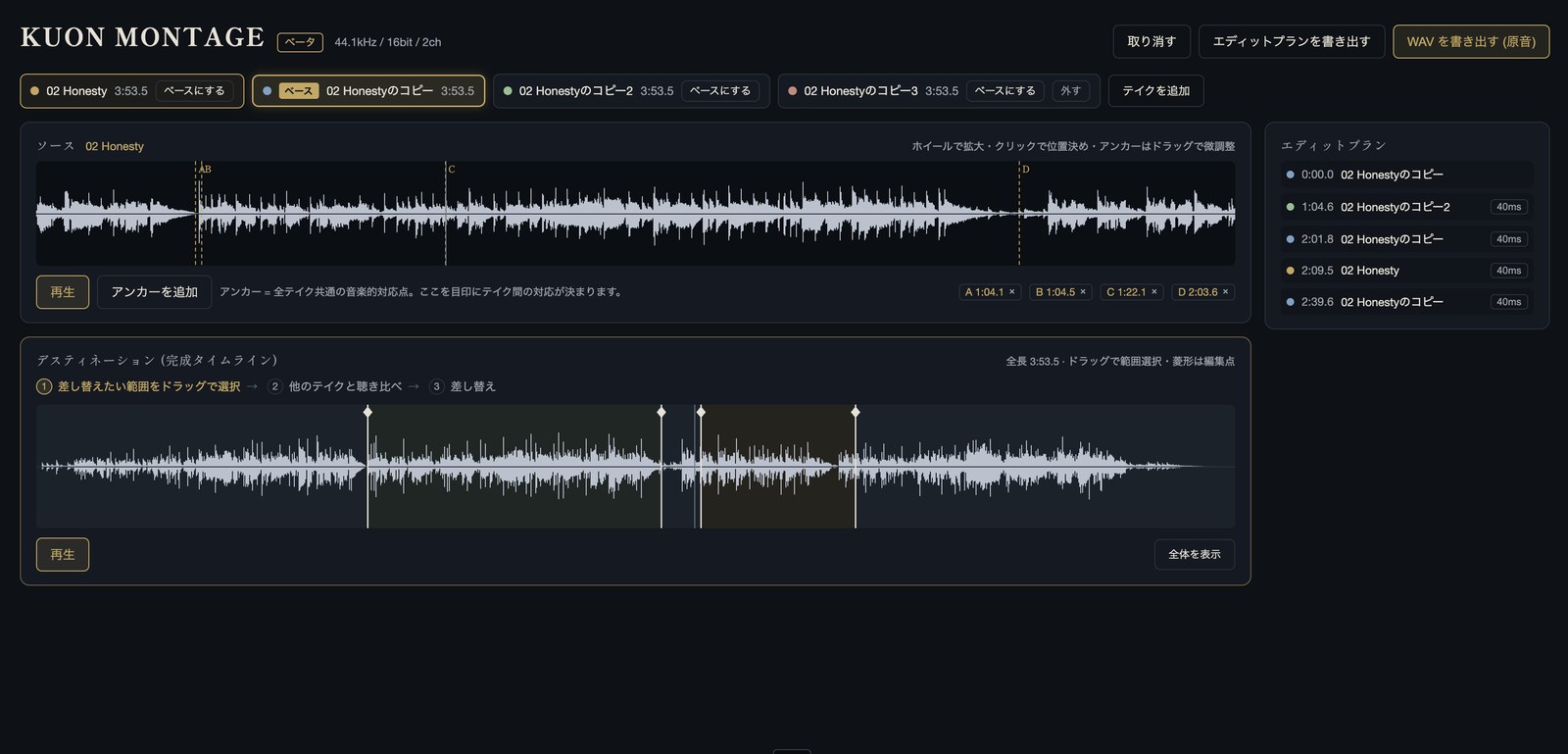
The actual KUON MONTAGE screen — four takes, anchors, and an edited destination timeline

The real screen: four takes, anchors A–D, an edited timeline and the edit plan.

THE TOOLKIT

Only what the editing room needs — but deep.

Anchor matching
The same musical point is estimated across every take automatically. Even when tempo breathes, you compare phrase against phrase. Your ears always make the final call.
Crossfade editor
Five curve types with adjustable bend, independent for the outgoing and incoming sides, asymmetric lengths, centre offset. Solo-audition either side and make the join disappear.
Sample-accurate zoom
Zoom down to 2ms, all the way to individual sample dots. Edit points nudge in 0.1ms steps.
BWF metadata preserved
Broadcast-wave metadata — the recording provenance used in broadcast and archive work — survives the edit and is carried into your export.
The edit plan
A running list of which take covers which passage. Export it as text for your records or your client.
Focus mode and standard shortcuts
Full-screen focus mode, Space to play, Return to the top, undo and redo. The same muscle memory you bring from the studio.
AN HONEST COMPARISON

With respect to the great workstations.

This craft was built by great workstations — Pyramix, Sequoia. KUON MONTAGE does not replace everything they do. It brings the core workflow within everyone’s reach.

AspectWorkstations (Pyramix / Sequoia)KUON MONTAGE
Source-destination editingYesYes (first in a browser)
Matching points across takesManualAuto-estimated + manual fine-tune
PriceFrom several thousand dollars$149 one-time / included in Concerto
InstallationDedicated setup requiredNone (browser only)
Multitrack bundles, plug-ins, DSDYes — this remains their domainNo (WAV up to 8 channels per file)
AFTER THE EXPORT

The road continues after the edit.

Verify — free
Check your export against streaming loudness standards with MASTER CHECK — free with a Kuon account.
Go further — Concerto
When a release needs loudness, KUON MAXIMIZER takes over — with the KUON DAR editing bench and everything else in Concerto.

$149 standalone — or Concerto at ¥1,980/month for MONTAGE + MAXIMIZER + DAR and 30+ apps.

PRICING

Two doors in.

Standalone
$149
On sale now — updates included
Own KUON MONTAGE forever
Updates free, forever
The price will step up as features land. Today’s price is the lowest it will be.
Concerto
¥1,980 / month
Available today
Everything — MONTAGE and 30+ apps
Including KUON MAXIMIZER and KUON DAR
Your sign-up price, kept for good.
FAQ

Answered before you ask.

What is source-destination editing?

You choose the best passages from your takes (the source) and set them into a finished timeline (the destination). It is the standard method for editing classical sessions, also known as “montage”.

Why can’t classical sessions punch in?

Several musicians play at once and the hall’s reverberation is continuous. A partial retake never joins cleanly — so you record full takes and stitch them afterwards.

Does the audio quality suffer?

No. You monitor on a lightweight preview, but the export stitches your original WAV files with sample accuracy — same bit depth, same sample rate.

Which formats are supported?

WAV and RF64 (over 4GB), from 44.1kHz to 384kHz, 16/24/32-bit, up to 8 channels per file. All takes must share one sample rate and channel count.

Is my audio uploaded?

No. From import to export, everything happens on your device. An unreleased performance never touches the network.

How does it differ from Pyramix or Sequoia?

The core source-destination idea is the same, but KUON MONTAGE is an editor only. Multitrack bundles, third-party plug-ins and DSD remain workstation territory. In return you get automatic take matching, zero installation, and a $149 price.

Standalone or subscription — which one?

Standalone ($149 one-time) means owning MONTAGE outright. Concerto (¥1,980/month) adds KUON MAXIMIZER, KUON DAR and 30+ other apps. If you only edit, buy it once; if you finish records too, Concerto.

Can I edit multi-file spot-mic bundles per take?

Today one take is one file — including poly WAV up to 8 channels from field recorders. Separate-file bundles are under consideration as requests come in.

THE MAKER

A tool born inside the editing room.

KUON MONTAGE was designed by the artist Kotaro Asahina, who has lived with recording for 35 years — writing take numbers into scores, chasing joins late into the night. He built this so the craft could belong to everyone.

“The best performance is always scattered across the takes.”
Read the profile

Your takes arealready waiting.

Drag in your WAVs and the editing room opens.

Open KUON MONTAGE$149 one-time — or included in Concerto at ¥1,980/month
KUON MONTAGE · 手に入れる

二つの入口があります

このアプリだけを買い切るか、Concerto で Kuon のすべてを使うか。どちらでも同じアプリが動きます。

Concerto を見る(月 ¥1,980)

買い切りには、その後のアップデートも含まれます。

日本国外のお客様には、決済画面で現地通貨の価格が表示されます。